
Docs / Network & Monitoring
Bluetooth scanner
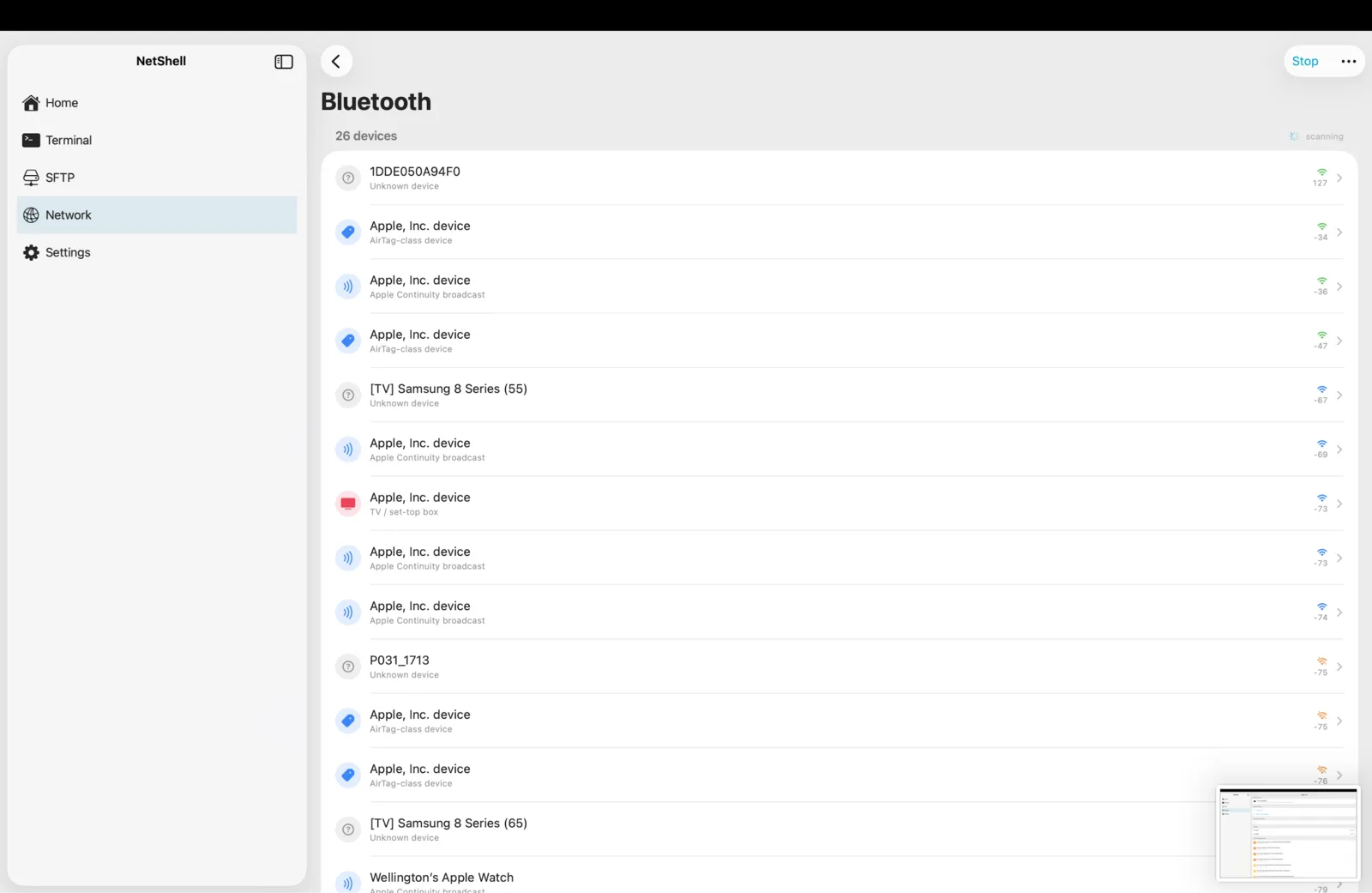
See the Bluetooth devices around you, identified live by vendor and service, and checked against known security advisories — all from your iPhone, iPad or Mac.
What the Bluetooth scanner does
NetShell's Bluetooth scanner listens for Bluetooth Low Energy (BLE) advertisements broadcast by nearby devices and turns the raw signals into a readable list. Instead of cryptic identifiers, you get a named, classified inventory: what each device is likely to be, who made it, what services it advertises, and whether any of those services map to a published security advisory. It sits in the Network & Monitoring area alongside the network scanner, so the same app that runs your servers also surveys the airwaves around them.
Run a scan
- Open the Bluetooth scanner from the home dashboard.
- Grant the Bluetooth permission when iOS or macOS prompts — the scanner cannot see anything without it.
- Watch devices populate the list as their advertisements arrive. Signal strength and details refresh as each device re-broadcasts.
- Tap any device to open its detail view with the full breakdown of fields.
Live classification
Each device is classified as it appears, using the data carried in its advertisement rather than a fixed database snapshot:
- Device class — the scanner infers a likely category (phone, computer, TV, audio device, input device, printer, wearable, and more) from the mix of name, advertised services, and manufacturer data.
- Vendor — the manufacturer ID in the advertisement is resolved against the official Bluetooth SIG company-identifier registry, fetched live, so newly assigned vendors are recognised without an app update.
- Services — advertised service UUIDs are resolved against the Bluetooth SIG service and member UUID registries to show human-readable service names.
Apple devices linked to an iCloud account often advertise in a distinctive way — a resolvable name with no manufacturer data — and the scanner flags those accordingly. It also bridges nearby network devices it can identify (such as TVs, printers, and speakers) into the same list so you get one combined view of what's around you.
CVE lookup
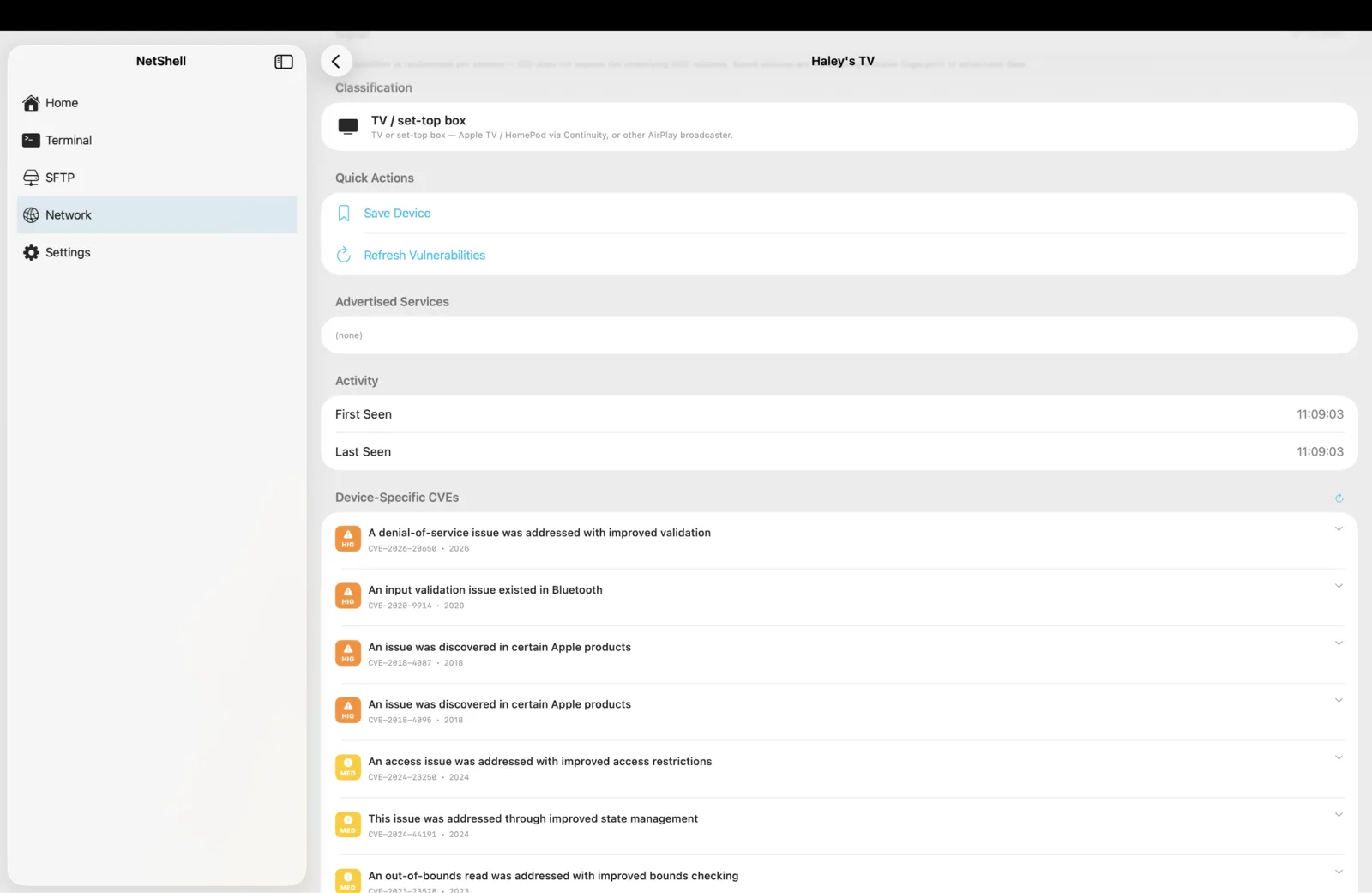
When a device advertises a service or profile that has known published vulnerabilities, NetShell can look those advisories up against the public NIST National Vulnerability Database (NVD) so you can see whether anything nearby is associated with a documented issue. Results are pulled from the live source rather than a bundled list, so the advisory data stays current. Treat any match as a prompt to investigate — a CVE associated with a device class is a starting point for triage, not proof that a specific unit in front of you is exploitable.
Field meanings
Inside a device's detail view you'll see fields like these:
- Name — the advertised (or OS-resolved) name, if the device broadcasts one. Many devices advertise anonymously and show only a class or vendor.
- Vendor / manufacturer — the company resolved from the manufacturer ID in the advertisement.
- Device class — NetShell's best-guess category for the device.
- Signal strength (RSSI) — a relative indicator of how close or strong the device's signal is; stronger usually means nearer.
- Service UUIDs — the GATT services the device advertises, shown with their registry names where known.
- Advisories — any CVE matches found for the device's services or class.
Saving known devices
You can save a device you recognise so it stands out on future scans. Because Bluetooth identifiers are randomised by iOS between sessions, NetShell identifies a saved device by a stable fingerprint derived from its manufacturer ID, sorted service UUIDs, and advertised name — not by the rotating system identifier. That means a peripheral you saved earlier is recognised again later even though its raw identifier has changed.
- Save the devices you own or expect to see, so anything unexpected is easy to spot.
- Saved devices carry enriched detail you've confirmed, making the list more meaningful over time.
- Saved-device records stay on your device and are not synced as part of iCloud sync — by design, since the fingerprint is local to what you've observed.
Privacy and limits
The scanner is passive: it listens for advertisements that devices broadcast publicly and does not connect to or pair with them. It works on iPhone, iPad and Mac, and like the rest of NetShell it sends no telemetry by default — analytics are strictly opt-in. See Privacy & telemetry for the full picture. A few practical limits worth knowing:
- Only BLE-advertising devices appear; classic Bluetooth peripherals that don't advertise won't show up.
- Devices that joined after a scan started may not be bridged in from the network side until the next scan.
- Classification is a best guess from advertised data — a clear, named match is more certain than an anonymous one.
Where it fits
Pair the Bluetooth scanner with the network scanner to map both the wired/Wi-Fi and the radio sides of an environment, then use server monitoring to keep an eye on the hosts you actually run. NetShell is an SSH client for iPhone, iPad & Mac — download it from the App Store to try the scanner yourself.