
Docs / Network & Monitoring
Docker management
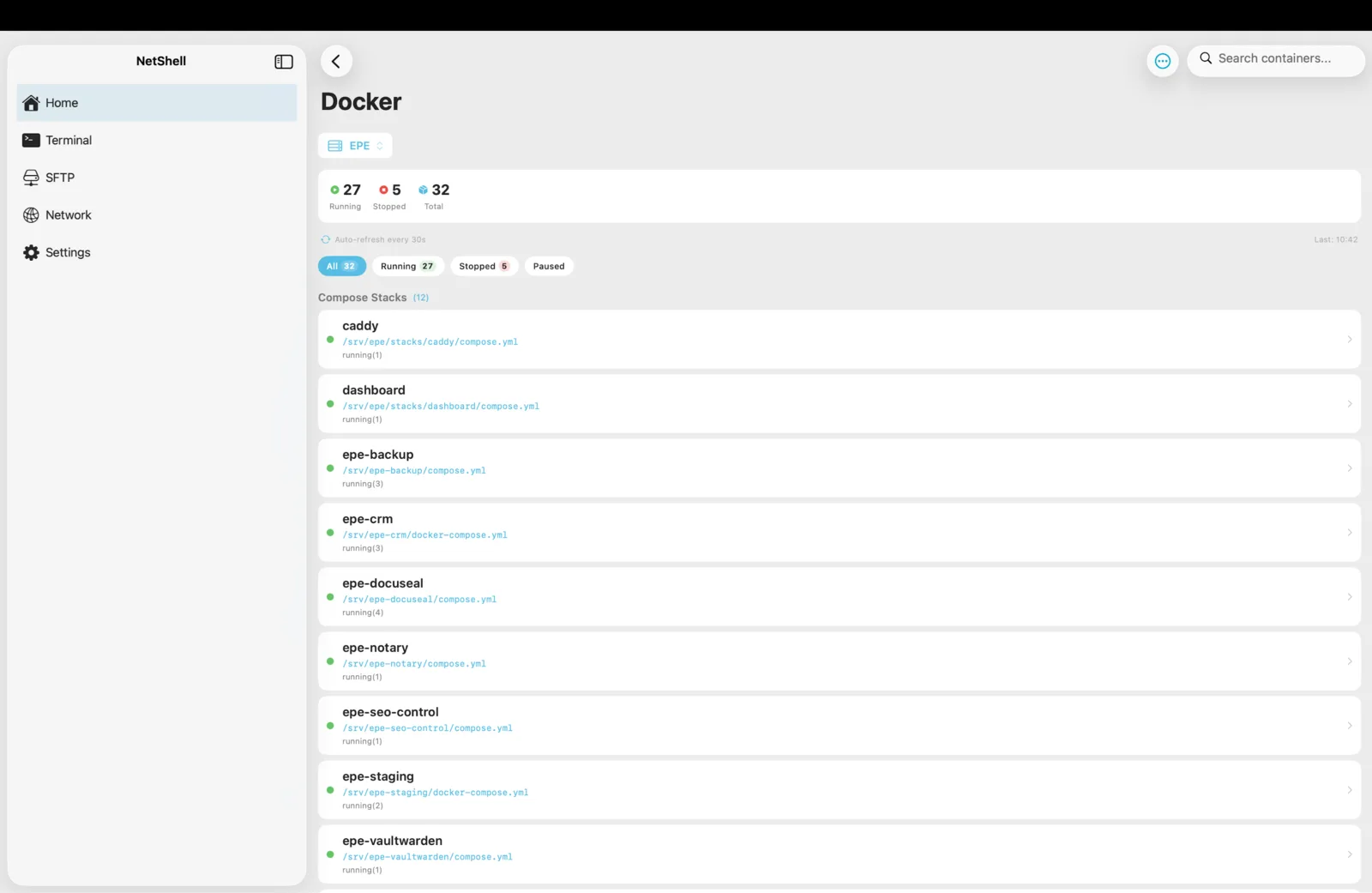
Run your containers and Compose stacks from your iPhone, iPad & Mac — list, start, stop, restart, inspect, and read logs over the same secure SSH connection that powers your terminal.
What Docker management does in NetShell
NetShell talks to the Docker daemon on a server you already connect to over SSH. There is no agent to install and no port to expose — the app issues Docker commands through your existing SSH session, so the same host verification, key handling, and command protections that guard your terminal also guard your container operations. You get a structured view of every container and Compose stack on the host instead of typing docker ps by hand and squinting at the output.
Choose which connection hosts Docker
Docker isn't a separate login — it runs against one of your saved SSH connections. Pick the host that runs the Docker daemon:
- Open the Docker area from the home dashboard.
- Select the SSH connection that hosts Docker. This becomes the active Docker host.
- NetShell queries that host and lists its containers and Compose stacks.
If you manage several servers, switch the selected connection at any time to point Docker management at a different machine. Add or edit the underlying server first in Add a connection.
docker group, or access to sudo docker. If commands come back empty or permission-denied, confirm that account can run docker ps in a normal terminal session first.View containers
The container list shows what's running on the selected host so you can see state at a glance:
- Container name and image.
- Status — running, stopped, restarting, or exited.
- Published ports and other quick metadata.
Tap a container to open its detail view, where the lifecycle actions and logs live.
View Compose stacks
Containers started together with Docker Compose are grouped as a stack rather than scattered through a flat list. That keeps multi-service apps — a web server, its database, a cache, a worker — together so you can reason about and act on the whole project, not just one piece of it.
Start, stop, and restart
From a container's detail view you can control its lifecycle:
- Start a stopped container.
- Stop a running container gracefully.
- Restart to cycle a container — useful after a config change or to clear a wedged process.
Actions apply to the selected container on the active host and reflect in the status as soon as the daemon responds.
Inspect a container
Inspect surfaces the daemon's full description of a container — image, environment, mounts, networks, ports, and runtime configuration. Use it to confirm exactly how a container was launched, which volumes are attached, or which network it joined, without leaving the app for a raw docker inspect dump.
Read logs
Open a container's logs to see its recent output — the fastest way to find out why something crashed or what a service is doing right now:
- Read stdout/stderr the container has produced.
- Scroll back through recent history to catch the error that preceded a restart.
- Pair logs with Restart to confirm a fix took hold.
docker exec, building an image, or editing a Compose file — drop into a full terminal session on the same host. You can also save frequent commands as snippets.Working with remote-only Docker hosts
If the Docker server lives on a private network you can't reach directly, connect through a jump host. NetShell chains the hops securely, then runs Docker management against the final host as usual. To move build artifacts or Compose files onto the server, use the SFTP browser.
Safety while you manage containers
Docker management inherits NetShell's protections. Host identity is verified at handshake time and fails closed, so your credentials are never sent to an unknown or changed server — see host verification. The destructive-command guard watches terminal input on the same host and intercepts dangerous commands such as rm -rf, DROP TABLE, git push --force, shutdown/reboot, kubectl delete namespace, and pipe-to-bash before they run — see the command guard. And the app auto-relocks behind Face ID after it sits idle.
Get NetShell
NetShell is an SSH client for iPhone, iPad & Mac with no account and no telemetry by default. Download it on the App Store, then add the server that runs your Docker daemon.